UX vs. UI design is one of the most commonly confused pairings in the digital product world, and the confusion isn’t harmless. Teams that treat these two disciplines as interchangeable often end up with products that look polished but frustrate users, or systems that function logically yet feel visually unfinished. Understanding where one discipline ends and the other begins is the first step toward building something people genuinely want to use.
At the simplest level, UX stands for user experience, and UI stands for user interface. UX covers the overall journey a person takes through a product, including whether it solves their problem efficiently and painlessly. UI covers the specific visual and interactive elements a person actually touches, from buttons to typography to color choices. Both disciplines work together constantly, but they require different skills, different research methods, and different ways of thinking about a product.
This guide breaks down exactly what separates the two disciplines, why the distinction genuinely matters for business outcomes like conversion and retention, how UX and UI collaborate in practice, and how to evaluate whether a product is succeeding at both. By the end, you’ll have a clear, practical understanding you can apply whether you’re hiring designers, building a product, or starting a design career yourself.
Understanding UX vs. UI design starts with clear, separate definitions, since the terms get used loosely and interchangeably far too often in casual conversation.
User experience (UX) design is the discipline focused on how a product feels to use, from first impression through every subsequent interaction. UX designers study user behavior, map out user journeys, conduct usability research, and build wireframes that outline the logical structure of a product before any visual design begins. The goal is to ensure a product solves a real user problem in the most intuitive, frictionless way possible.
User interface (UI) design focuses specifically on the visual and interactive layer of a product, including buttons, icons, typography, color palettes, spacing, and animation. UI designers take the structural framework established during the UX phase and transform it into a polished, aesthetically cohesive interface that’s both attractive and easy to interact with.
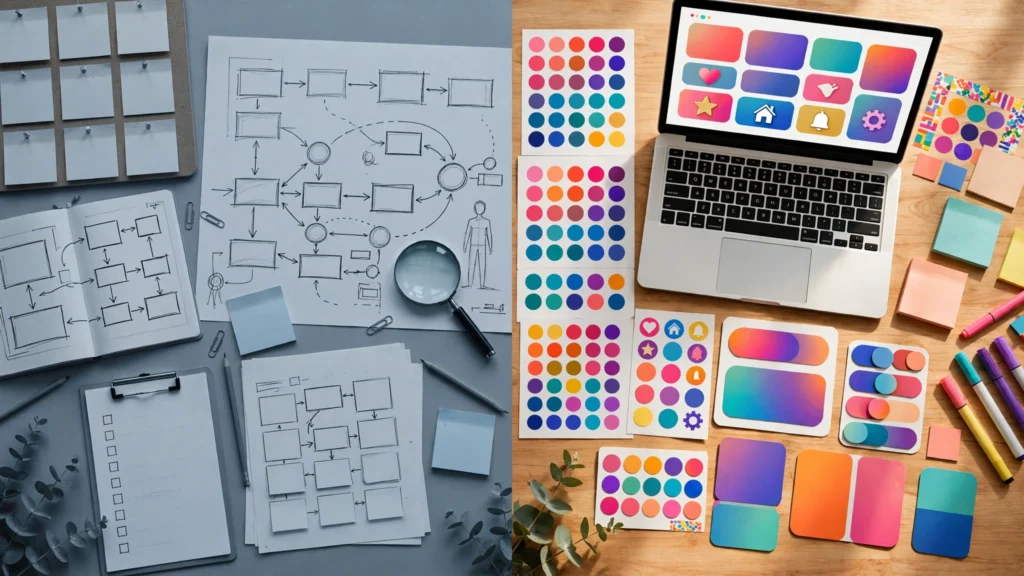
The clearest way to separate UX vs. UI design is this: UX is about how a product works and feels, while UI is about how a product looks and behaves visually. A well-designed product needs both working in harmony — strong UX without good UI can feel clunky and unfinished, while polished UI without solid UX can look beautiful but frustrate users trying to complete basic tasks.
UX design covers the entire user journey, from initial research through information architecture and usability testing. UI design has a narrower scope, focused specifically on the visual presentation layer of a finished structure.
In most workflows, UX comes first. Designers need to establish the user journey, validate information architecture, and test flows through prototyping before visual design begins. Building UI on top of unvalidated UX is a common and expensive mistake, since teams end up polishing something that may still need major structural changes.
UX designers rely heavily on research methodology, systems thinking, and behavioral psychology. UI designers draw more on visual design sensibility, typography, color theory, and motion design. While some professionals develop skills in both areas, the underlying disciplines require genuinely different strengths.
UX designers frequently work with tools built for wireframing, user flow mapping, and prototyping, while UI designers rely more heavily on visual design and interface tools focused on pixel-level precision, component libraries, and design systems.
UX success is typically measured through metrics like task completion rate, user satisfaction scores, and retention. UI success is often evaluated through visual consistency, interface responsiveness, and how effectively design choices support usability.
UX designers typically produce wireframes, user flow diagrams, journey maps, and research reports. UI designers produce high-fidelity mockups, style guides, and interactive prototypes ready for development handoff.
UX shapes the underlying logic and structure of a product, essentially the “skeleton.” UI shapes the surface-level presentation, essentially the “skin.” Both are necessary, but they address fundamentally different layers of the same product.
Research from the Baymard Institute has found that a significant majority of online shopping carts are abandoned, often due to poor UX decisions like confusing checkout flows or unexpected fees introduced late in the process. When users struggle to complete a task, they simply leave, taking potential revenue with them.
Even when the underlying UX is sound, a poorly designed UI can make a product feel unprofessional or untrustworthy. First impressions form within seconds, and a cluttered or dated interface can drive users away before they even engage with the actual functionality.
When both disciplines are executed well together, products see measurable improvements in user satisfaction, task completion, and long-term retention. Users who find a product both functional and visually pleasing are significantly more likely to return and recommend it to others.
Business leaders and product managers who understand this distinction are better equipped to hire the right specialists, set realistic project timelines, and give more useful feedback during the design process, rather than conflating two genuinely different skill sets.
This is perhaps the most widespread misconception. While closely related, UX and UI address entirely different aspects of a product, and treating them as synonyms often leads to confused hiring decisions and unclear project scopes.
Asking whether UX or UI matters more is similar to asking whether a building’s structural engineering or its interior design matters more. Both need to be right, or the final result either fails functionally or repels users visually.
Both disciplines actually extend beyond apps and websites. The way a physical retail store is laid out to guide customers smoothly through the aisles reflects UX thinking, while the way airport signage uses color and symbols to direct travelers reflects UI principles in a physical space.
In practice, especially at smaller companies, individual designers often do handle both responsibilities. However, it’s worth recognizing that the skillsets involved are genuinely different, and depth in one area doesn’t automatically translate to strength in the other.
In many teams, the UX designer establishes user flows, wireframes, and information architecture first. Once the core structure has been validated through research and testing, this work is handed off to a UI designer, who transforms the wireframes into a fully realized visual interface.
While the handoff model is common, most successful teams maintain close collaboration between UX and UI designers throughout the entire project, rather than working in strict, sequential silos. Continuous feedback between both roles helps catch issues early, before they become expensive to fix later in development.
Both UX and UI deliverables ultimately guide the development team, translating research findings and visual designs into functioning code. Clear documentation and close communication between designers and developers help ensure the final product matches the intended experience.
Aspiring UX designers typically develop skills in user research, wireframing, usability testing, and information architecture. Many pursue formal coursework or certifications, alongside building a portfolio demonstrating real problem-solving through case studies.
Aspiring UI designers focus more heavily on visual design fundamentals, including typography, color theory, layout, and interaction design. A strong UI portfolio typically showcases polished, cohesive interface work across a variety of product types.
Some professionals choose to specialize deeply in just one discipline, while others pursue a hybrid path covering both responsibilities. Either approach can lead to a successful career, though hybrid designers often find the most opportunities at smaller companies or startups with limited design headcount.
Consider a mid-sized ecommerce company noticing a high cart abandonment rate despite steady traffic. After investigating, their UX team discovers the checkout process requires too many steps and asks for unnecessary information upfront, creating friction that drives users away before completing a purchase.
Once the UX team simplifies the flow and validates the new structure through user testing, the UI team steps in to redesign the visual layer, adding clear progress indicators, a more prominent checkout button, and cleaner typography that reduces visual clutter. Within a few months of launching the updated experience, the company sees a measurable drop in cart abandonment and an increase in completed purchases.
This example illustrates why understanding UX vs. UI design matters practically, not just academically: the fix required both disciplines working together, since improving the visual design alone wouldn’t have resolved the underlying structural friction, and simplifying the flow alone wouldn’t have addressed the confusing visual presentation.
1. What is the main difference between UX vs. UI design?
UX design focuses on how a product functions and feels throughout the entire user journey, while UI design focuses specifically on the visual and interactive elements a user directly interacts with.
2. Which comes first, UX or UI design?
UX design typically comes first, establishing user flows and information architecture, which UI designers then use as the foundation for the visual interface.
3. Can one person handle both UX and UI design?
Yes, especially at smaller companies, though the two disciplines require genuinely different skills, so depth in one area doesn’t guarantee strength in the other.
4. Why does UX vs. UI design matter for business success?
Poor UX can directly drive users away through confusing or frustrating experiences, while poor UI can undermine trust and credibility, both of which negatively affect conversion and retention.
5. Do UX and UI design apply outside of digital products?
Yes. Both disciplines extend to physical spaces as well, such as store layouts reflecting UX principles and signage systems reflecting UI thinking.
Understanding UX vs. UI design means recognizing that these two disciplines, while closely connected, address fundamentally different layers of a product — UX shapes the underlying structure, logic, and overall journey a user experiences, while UI shapes the visual presentation and interactive details a user directly touches, and a genuinely successful product requires both working in close collaboration, since strong UX without polished UI feels unfinished, and attractive UI without solid UX ultimately frustrates the very users it was meant to serve. For teams building digital products, investing thoughtfully in both disciplines, rather than treating them as interchangeable, remains one of the clearest paths toward higher user satisfaction, stronger retention, and measurably better business outcomes.

Contributor at SavingGuideHub, writing practical guides on finance, savings, and insurance.

Sharing practical finance and savings guidance.